8mm vs MiniDV: Understanding the Key Differences in Video Formats
8mm video tapes (Video8, Hi8 and Digital8) are larger cassettes from Sony's 8mm family, introduced from 1984; Video8 and Hi8 record analog video, Digital8 records digital video. MiniDV is a smaller, fully digital tape introduced in 1995. No camcorder plays both, so you need the right player or a transfer service; Capture digitizes either format for $19.99 per tape.

When you open a box of old camcorder tapes, 8mm and MiniDV cassettes are easy to mix up: both are small, both came out of the camcorder years between VHS and phones, and many families switched from one to the other without noticing. The two formats record video in different ways, age differently and need different equipment to play, so it is worth knowing which one you have before you buy a player or send tapes off for transfer.
How Can You Tell an 8mm Tape From a MiniDV Tape?
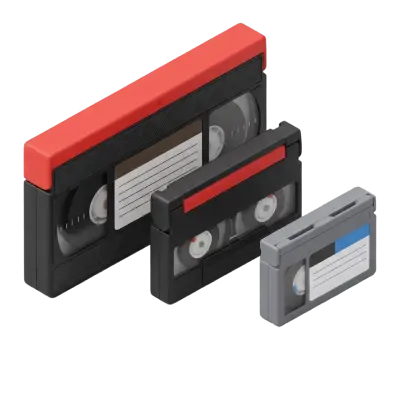
Start with size and the label on the shell. An 8mm cassette is about the size of an audio cassette; the DV cassette is noticeably smaller and thinner.
| Video8 | Hi8 | Digital8 | MiniDV | |
|---|---|---|---|---|
| Cassette size | 95 × 62.5 × 15 mm | Same as Video8 | Same as Video8 (uses Hi8 tape) | 66 × 48 × 12.2 mm |
| Label on the shell | "8mm" or "Video8" | "Hi8" | Hi8 tape, recorded in a Digital8 camcorder | "MiniDV" or "DV" logo |
| Recording | Analog | Analog | Digital (DV) | Digital (DV) |
| Recording time | Printed on the cassette (a P6-120 holds 120 minutes) | Printed on the cassette | 60 min on a P6-120 cassette (90 in LP mode) | Printed on the cassette |
| Plays in | 8mm or Hi8 camcorders, and many Digital8 camcorders | Hi8 camcorders, and many Digital8 camcorders | Digital8 camcorder only | MiniDV camcorder or deck |
| Introduced | 1984 | 1989 | 1999 | 1995 |
The tricky case is Digital8. It records digital video on an ordinary Hi8 cassette, so the tape says "Hi8" even though the recording is digital. If a tape plays as a blank or noisy picture in a Hi8 camcorder, it may be a Digital8 recording. "8mm" here always means tape width; it has nothing to do with 8mm movie film, which is a reel of film for a projector.
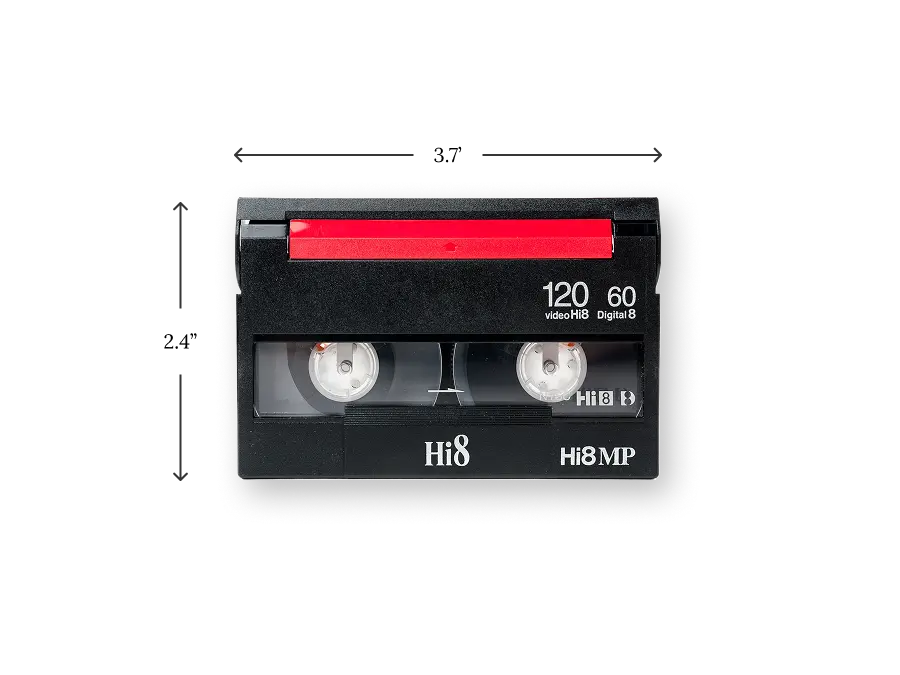
A Hi8 cassette: the same shell size is used for Video8 and Digital8 recordings.
A Brief History of 8mm and MiniDV
8mm Tape Features and Origins
Video8 launched in 1984 as a compact alternative to VHS and Betamax camcorders, with picture quality similar to standard-play VHS. Hi8 followed in 1989 with sharper pictures, officially rated at 400 lines of luminance resolution, and Digital8 arrived in 1999, recording DV video on the same cassettes so owners could keep their tapes and camcorder habits.
MiniDV Tape Advantages and Origins
MiniDV launched in 1995 as the small cassette of the DV standard, developed by a group of camcorder makers led by Sony and Panasonic. It records 720 × 480 digital video (720 × 576 in PAL countries) with 16-bit PCM stereo audio on a cassette noticeably smaller and thinner than an 8mm tape.
Video8, Hi8 and Digital8 vs MiniDV
Video8 vs MiniDV: Video8 is analog with fairly soft detail, similar to standard-play VHS. A DV recording looks clearly sharper, with cleaner color and stable frames.
Hi8 vs MiniDV: Hi8 is the best of the analog 8mm formats and competes with S-VHS for sharpness, but MiniDV still wins on clarity and audio because it is digital. Watching them at home needs a working Hi8 or Digital8 camcorder, so playing Hi8 tapes usually means finding a used one.
Digital8 vs MiniDV: the picture is essentially the same, because both use the DV format. The differences are the cassette (Digital8 uses Hi8 tape) and the camcorder needed to play it. Digital8 camcorders could usually also play older Video8 and Hi8 tapes, which is why many families with mixed collections kept one.
So is MiniDV digital or analog? Always digital. Within the 8mm family, only Digital8 is digital.
How Do 8mm and MiniDV Age Differently?
Analog 8mm tapes usually fade gradually. As the magnetic particles weaken and the binder dries out, you see more snow, color loss, tracking lines and short dropouts, so there is often a warning before a tape becomes unwatchable. Mold from damp storage makes it worse.
MiniDV and Digital8 tapes tend to fail suddenly. When part of the recorded data cannot be read, the picture breaks into blocks, freezes or loses sound, and the same spot can play on one pass and fail on the next. Heat and humidity damage both kinds, and both depend on camcorders that are no longer made.
Audio Quality Differences
Video8 and Hi8 record analog AFM audio (a digital PCM track was an optional extra), which picks up hiss and muffled voices as the tape ages. DV tapes record digital PCM audio that stays clear until it drops out completely. For weddings, speeches and recorded conversations, that difference often matters more than the picture.
Transferring 8mm and MiniDV to Digital
The two formats are transferred in different ways:
- Video8 and Hi8 are played on a calibrated camcorder or deck, and the analog signal is captured and encoded into a digital file. Clean heads and correct tracking decide how good the result is.
- MiniDV and Digital8 already hold digital video, so the data is copied over FireWire (IEEE 1394) into a file without re-recording, which keeps the original quality when the tape reads cleanly.
When you choose a service, check three things: that it handles all of your formats in one order, how it treats tapes that are damaged or moldy, and how files are delivered. Capture digitizes Video8, Hi8, Digital8 and MiniDV tapes for $19.99 per tape in standard definition, $29.99 in Full HD or $39.99 in 4K, regardless of length, with 90 days of cloud access and the original tapes returned.
Frequently Asked Questions
Is MiniDV digital or analog?
MiniDV is digital. It records DV video and PCM audio as data on the tape, which is why it can be copied to a computer over FireWire without losing quality. Video8 and Hi8 are analog; Digital8 is digital.
Can a MiniDV camcorder play 8mm tapes?
No. MiniDV and 8mm cassettes are different sizes and use different recording systems, so no camcorder plays both. 8mm tapes need a Video8, Hi8 or Digital8 camcorder or deck; the smaller tapes need a MiniDV camcorder or deck.
Is Hi8 better than MiniDV?
No. Hi8 is the sharpest analog 8mm format, but the digital format gives a clearer picture, steadier color and better sound.
What is the difference between Digital8 and MiniDV?
Digital8 and MiniDV use the same DV video codec, so picture quality is about the same. Digital8 records on Hi8 cassettes and plays only in Digital8 camcorders, while MiniDV has its own smaller cassette.
Which format lasts longer, 8mm or MiniDV?
Neither is safe long term. Analog 8mm tapes fade gradually over decades, while digital tapes can fail suddenly when data blocks become unreadable. Transferring both to digital files while the tapes still play is the safest option.
Keeping Your 8mm and MiniDV Memories Alive
Whether your box holds Video8, Hi8, Digital8 or MiniDV, the first step is the same: identify each tape by its size and label, keep them cool and dry, and stop replaying fragile tapes. Capture transfers every one of these formats in a single order and returns your originals, so you can stop hunting for working camcorders. Get a free quote to see the cost for your collection.
Early access: 22% off orders $100+
You May Also Like

How to Convert a DVD to a Digital File: 3 Free Ways
You can convert a home-made DVD to a digital file for free by copying its VIDEO_TS folder to your computer or by converting it to MP4 with HandBrake, which runs on Windows and Mac. You need a computer with a DVD drive, or an external USB drive for about $45–$55. Commercial movie DVDs are copy-protected, so these steps are for discs you recorded yourself. If you have a stack of discs, Capture converts them to MP4 for $19.99 per disc.
How AI Video Upscaling Works: De-interlacing, Noise Reduction, and Resolution Scaling Explained
AI video upscaling works in three stages: the original tape is captured using broadcast-grade equipment to extract the cleanest possible signal, encoded into a lossless ProRes master file, then processed frame-by-frame by neural networks that remove interlacing artifacts and increase the resolution to 1080p or 4K. Unlike a standard 1:1 transfer, the AI analyzes each frame individually — inferring missing detail from surrounding pixels and learned patterns — while preserving the original frame rate throughout.

Choosing the Perfect Film Video Camera: Top 10 Recommendations for Filmmakers
Film video cameras record motion by capturing a rapid sequence of still images on photographic film — typically at 24 frames per second for cinema and 16–18 fps for home formats like 8mm and Super 8. Unlike digital video, film requires chemical development before it can be viewed, and the footage degrades over time without proper cold, dry storage.