Hi-8 Tape Players, Converters, and Other Options to Watch Hi-8 Tapes
Hi8 tapes play only on a Hi8 or Digital8 camcorder or a dedicated Hi8 deck, and none of these are made anymore, so you'll be buying used. A used player plus a $40–$90 capture device lets you watch and copy tapes at home. If you'd rather skip the hardware, Capture transfers Hi8 tapes to digital for $19.99 per tape, regardless of length.

Hi-8 tapes were a popular way to record family memories throughout the late 1980s and 1990s. Today, many households no longer have the original camcorder, and finding a working Hi8 tape player takes some searching. The tapes themselves also degrade with age, so every year you wait makes playback a little riskier.
There are still several ways to watch your Hi-8 tapes: play them on a camcorder, connect a Hi-8 player to your TV, transfer them to a computer with a converter, or send them to a transfer service. Below are the players still worth looking for, the converters that work with them, and the options if you don't want to buy anything.
Quick List of Hi-8 Tape Players, Converters, and Other Options to Watch Hi-8 Tapes
Sony EV-C2000E Hi8 Video8 8mm Video Cassette Recorder Player
Sony GV-D800 Digital Hi8 Video8 8mm Cassette Tape Recorder Player
Diamond VC500 USB 20 One Touch VHS to DVD Video Capture Device
How to Watch Hi-8 Tapes with a Hi-8 Tape Player
When it comes to Hi-8 tape players, you have a few different options. The simplest is to use a Hi-8 camcorder to view your tapes. The small screen limits group viewing, but with an AV cable you can plug your video camcorder into a television.
For easier use and better picture quality, look for a dedicated Hi-8 player, which you can still find used on eBay or Amazon. When choosing, consider ease of use, durability, picture quality, and the features you actually need.
The 8mm video format was developed by a group of companies including JVC, Philips, Sony, and Matsushita (now Panasonic) to compete with VHS-C and Betamax, but not all of them made Hi-8 players that are still easy to find today. These are the models we recommend looking for.
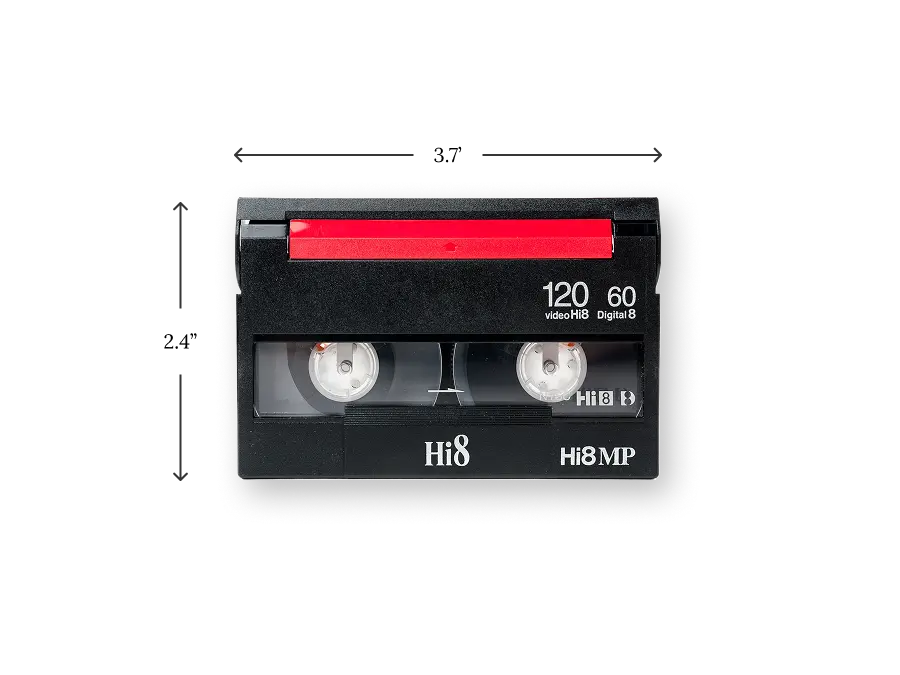
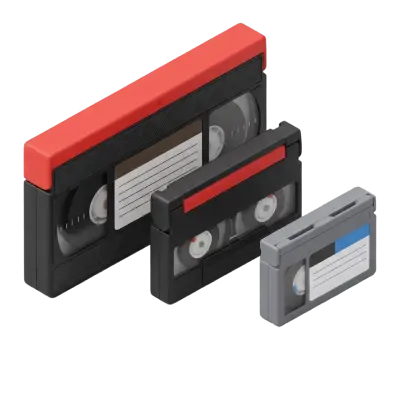
A Hi8 tape is about 3.7 × 2.4 inches. Any Hi8 tape player or Hi8 camcorder will also play older Video8 tapes.
Sony EV-C2000E Hi8 Video8 8mm Video Cassette Recorder Player
Usually listed on eBay for around $150 to $200, this deck plays all types of analog 8mm tapes, including Hi-8 and Video8. It's simple to use and offers both recording and playback, with HiFi stereo sound, LANC control, and a clean still picture.
Sony GV-D800 Digital Hi8 Video8 8mm Cassette Tape Recorder Player
This portable Digital8 video Walkman costs more than other options, as much as $950, but it has a built-in LCD monitor and speakers, so you can watch tapes on the go or bring them to a family gathering. It also plays back Hi8 and Video8 tapes, and adds a time code generator, headphone output, and slow motion.
Sony EVO-S900 Hi8 VCR 8mm Video Cassette Player Recorder
This deck can be harder to find, but it's very durable, so with regular cleaning it's likely to last for years. It plays Hi-8 and Video8 tapes, but not Digital8, so if some of your tapes are Digital8, choose the GV-D800 or a Digital8 camcorder instead.
Sony CCD-TRV228E Hi8 Video8 8mm Handycam Camcorder
For an easy-to-use Sony Handycam that can both record and play Hi-8 tapes, this is a good option with 20x optical zoom. The viewing screen is small by modern standards, but it's portable, affordable, and about as nostalgic as you can get. If you plan to play tapes on another device, the Sony DCR-TRV460 Digital8 camcorder is a good alternative.

A working Hi8 camcorder is still the most common way to play Hi8 tapes at home.
Samsung SCL700 Hi-8 8mm Video8 Camcorder VCR Player Video
Often listed for around $100, this camcorder is one of the more affordable Hi8 players. Adapters and RCA cables make it easy to connect to a VCR or a modern TV with AV inputs. It works with PAL as well as NTSC and offers 22x optical zoom.
Canon ES8400V Hi8 Camcorder
This camcorder has a 2.5" LCD screen, easy handheld use, a zoom lens, and video effects that make it easy to watch and record Hi-8 tapes. Picture quality is good, with solid contrast even in poor lighting, but the sound quality is not great. It's still easy to find online.
Hi-8 Tape Player Converters
Another way to enjoy your Hi-8 tapes is to transfer them to your computer with a converter. You still need a working Hi8 player or camcorder: the converter only captures the signal. Our guide to the best VHS to digital converters compares more devices; the same ones work with Hi8 players. Prices below were checked in late October 2026.
Diamond VC500 USB 20 One Touch VHS to DVD Video Capture Device
One of the easiest ways to convert Hi-8 (as well as VHS, Betamax, MiniDV, and more) to digital is the Diamond VC500 video capture device. It uses RCA and S-Video inputs on one end and USB on the other, so you plug in your camcorder or Hi8 player and record to your computer. It costs $39.99 at diamondmm.com and works with Windows 11/10 and recent macOS versions. Audio and video quality are basic, but it's a decent option if you already have a player.
Pros
Easy to use with a single button
Affordable
Mac and PC support
Cons
Requires a Hi-8 player or camcorder (and may require adapters)
The sound quality is poor compared to some alternatives
The video quality is mediocre
Roxio Easy VHS to DVD 3 Plus
Roxio Easy VHS to DVD 3 Plus is a capture device with software for burning DVDs or saving digital files, and it works with Hi8 players as well as VCRs. It was $49.99 at Staples (regularly $69.99) in October 2026. The Windows version supports Windows 11; the Mac version supports only macOS 10.11 to 13.
Pros
Good quality results
Affordable
Helpful customer support
Cons
Limited support for current Mac operating systems
Requires both a Hi-8 player or camcorder and a computer
Time-consuming installation and tape transfer
Elgato Video Capture
Elgato Video Capture is a good option for users who like doing the whole transfer on a computer. It connects to your Hi-8 player with RCA or S-Video cables and records at 640 × 480. It lists at $89.99 on elgato.com, but was sold out there in October 2026, so you may need to buy it from another retailer. It can digitize almost anything with RCA or S-Video output, including MiniDV and DVD players.
Pros
Good video and audio quality
Durable design
Works with virtually any home movie source
Cons
May take some time to get the audio right
Hard to find new
No record button; the whole process runs on a computer
ClearClick Video to Digital Converter
ClearClick's Video2Digital Converter 2.0 costs $149.95 at clearclick.com, and the 3.0 model costs $209.95. Both are all-in-one recorders: plug in your Hi-8 player and watch the tapes on the built-in screen while recording to an SD card or USB drive, with no computer. Both record standard definition (720 × 480), which matches what Hi8 tapes hold.
Pros
Records to SD or USB with no computer
Built-in screen and speakers
Easy to share files afterwards
Cons
Takes time to learn all the buttons and functions
One of the most expensive options
No SD card or USB drive included
KWorld Video Capture USB TV Tuner Card
This capture card is no longer made, but it still turns up used on eBay for as little as around $25. It detects NTSC and PAL automatically and includes editing and DVD-burning software. Because you'll be buying used, check the seller's ratings and the device's condition, and expect below-average audio quality.
Pros
Very affordable
Includes editing and burning software
Good image quality
Cons
Hard to find because it's not being made anymore
Will likely need to buy used, which comes with some risk
Audio quality is below average
Watching Hi-8 Tapes without a Player
If you don't have a player and don't want to buy one or a converter, you can send the tapes to a professional conversion service like Capture, rent a Hi-8 camcorder, or borrow a Hi-8 player from a friend or relative.
Capture Video Tape Transfer Service
Capture's Hi8 to digital service transfers Hi8, Video8 and Digital8 tapes for $19.99 per tape in SD, $29.99 in Full HD or $39.99 in Ultra HD, no matter how long the tape is. The Full HD and Ultra HD tiers add AI upscaling, noise reduction and color correction, and come with the USB drive your files need. Minor tape repair and cassette case replacement are included at no extra charge, and you're never charged for blank tapes.
Most orders are digitized within 2–3 weeks of arriving at Capture's facility in Norcross, Georgia, where every tape is barcoded and tracked. Kit services such as Legacybox and Kodak Digitizing list 4–6 weeks.

Every tape is barcoded at intake, so you don't need a working Hi8 tape player to get your footage back.
Pros
$19.99 per tape regardless of length, with no player or converter to buy
Free minor tape repair and case replacement
Satisfaction guaranteed: if you're not happy, Capture reprocesses your order free within 60 days
90 days of free cloud access to watch, download and share
Cons
You have to ship your tapes (or drop them off in the Atlanta area)
Full HD and Ultra HD orders require a USB drive sized to your files, from $19.99
Player or Transfer Service? The Quick Math
If you only want to watch a couple of tapes, a used camcorder you can resell later may be the cheapest route. For a box of tapes, the numbers usually favor a service. A used Hi8 player or camcorder plus a $40–$90 capture device costs roughly the same as transferring 10 tapes, and copying at home runs in real time, so 10 two-hour tapes is about 20 hours of recording. Sending the same 10 tapes to Capture in SD costs $199.90, plus $12.49 return shipping, or $212.39 before tax.
Rent a Hi-8 Camcorder
Renting works if you want to transfer tapes yourself, watch them once, or shoot new footage in Hi-8. Some rentals, like the Sony CCD-TRV85 Hi-8 camcorder from DeckHand.com, come with a capture device (the Elgato Video Capture in that listing). You can also rent Hi-8 camcorders from ShareGrid.com in certain areas. Long-term rentals get expensive, so this is best for a short project.
Pros
Convenient
Good for transferring to digital or viewing once
Cons
Expensive for long-term rental
Limited availability
Borrow a Hi-8 Tape Player or Camcorder
You can always borrow or buy a Hi-8 player or camcorder from a friend, neighbor, or relative. It lets you transfer or watch tapes just like a rental, without paying (though you may want to buy them lunch to say thanks). It's also a good option for watching tapes together at a family gathering.
Pros
Free
Convenient
Cons
You need someone who still owns one
Not a good option for long-term use
Conclusion
There are plenty of ways to watch old Hi-8 tapes: buy a used Hi-8 tape player or camcorder, add a converter to copy them to your computer, or borrow a player from a friend. Whichever you choose, check the condition of any used device before you trust it with tapes you can't replace.
If you'd rather not hunt for hardware, Capture transfers Hi8 tapes to digital for $19.99 per tape, with free minor repairs and files back in about three weeks. Learn more about Capture's Hi8 transfer service, or get a free instant quote in about a minute.
Early access: 22% off orders $100+
You May Also Like
How to Convert a DVD to a Digital File: 3 Free Ways
You can convert a home-made DVD to a digital file for free by copying its VIDEO_TS folder to your computer or by converting it to MP4 with HandBrake, which runs on Windows and Mac. You need a computer with a DVD drive, or an external USB drive for about $45–$55. Commercial movie DVDs are copy-protected, so these steps are for discs you recorded yourself. If you have a stack of discs, Capture converts them to MP4 for $19.99 per disc.
How AI Video Upscaling Works: De-interlacing, Noise Reduction, and Resolution Scaling Explained
AI video upscaling works in three stages: the original tape is captured using broadcast-grade equipment to extract the cleanest possible signal, encoded into a lossless ProRes master file, then processed frame-by-frame by neural networks that remove interlacing artifacts and increase the resolution to 1080p or 4K. Unlike a standard 1:1 transfer, the AI analyzes each frame individually — inferring missing detail from surrounding pixels and learned patterns — while preserving the original frame rate throughout.

Choosing the Perfect Film Video Camera: Top 10 Recommendations for Filmmakers
Film video cameras record motion by capturing a rapid sequence of still images on photographic film — typically at 24 frames per second for cinema and 16–18 fps for home formats like 8mm and Super 8. Unlike digital video, film requires chemical development before it can be viewed, and the footage degrades over time without proper cold, dry storage.