Discover Google Photos: What Can Google Lens Do for You?
Content team: Add a 2-3 sentence summary/excerpt for this post to improve SEO and reader engagement.

Last week we shared with you all the ways you can easily share your photos with others with the click of a button! In part two of our three part series, see what Google Lens can do for you!
Google Lens is the most useful tool you never knew you needed. Conveniently integrated into Google Photos, Google Lens can quickly identify objects in your pictures and give you information about them. It is easy to use and can help with organization in your Google Photos app. Plus, you may learn a little something!
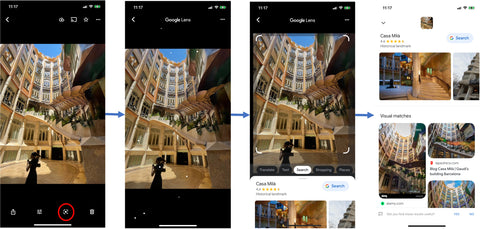
It works as a visual search engine, using artificial intelligence to scan images, display information, and perform tasks. For example, if there’s a building in the photograph, whether it’s a landmark or restaurant, Google Lens will be able to scan it, then recognize and provide details on it. It will show you opening and closing times, the way to get there and even the history behind the building.
But this is only the tip of the iceberg - Google Lens has so many more features. It also translates text, allows you to shop, search for things around you - the list goes on and on.
Here’s a quick description of some of Google Lens’ cool features:
Text Selection: If you have photos of documents or text, you can highlight which area you want Google Lens to scan. It will scan your text, then you have a choice of actions depending on what you scan:
- Copy text: copy then paste the text into your notes or a document
- Copy to computer: send the text to your laptop
- Search: search for whatever is shown in the image
- Listen: Google Lens will read the text out loud to you
- Translate: translate text into your preferred language with the power of Google Translate
- Call: if you’ve scanned a phone number, Google Photos will give you an option to call the number
Shopping: Google Lens can identify an item of clothing in a picture. Once it has scanned the item, it will show you that piece of clothing and similar items. You then have the option to purchase the item.
How to use Google Lens:
- Open up your Google Photos app and tap on ‘Photos’ in the bottom left corner
- Select the photo you want to use Google Lens on and tap on it to open it up
- On the bottom navigation bar, you will see the Google Lens icon (the third icon in the row)
- Tap on the icon and Google Lens will immediately start scanning your image
- Once it is finished, a page will pop up displaying the results of the Google search
Now that you know how to use the Google Lens feature and how to share your photos with friends and family, we have one more feature we want to show you to help you organize your Google Photos Library. Stay tuned next week for the last part of our Discover Google Photos series!
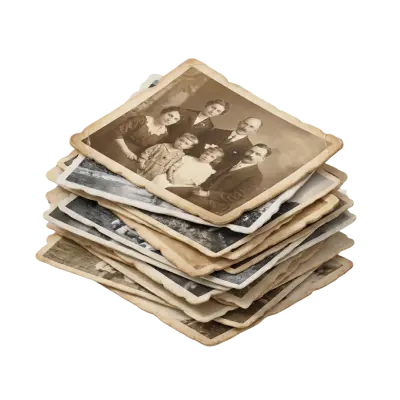
Ready to transfer your old photos so that you can add them to your Google Photos Library? We’ll help you get started here!
You May Also Like

How to Transfer a CD to a USB Flash Drive: Music, Photos, and Files
To transfer a music CD to a USB flash drive, you have to rip it first: import the tracks as MP3 or AAC files with Windows Media Player or Apple Music, then copy those files to the drive. Dragging tracks straight from the disc only copies 44-byte ".cda" shortcuts that won't play, while photo and data CDs can be copied and pasted directly. A 16GB flash drive holds about 100 albums as 320 kbps MP3.

Does Walgreens Transfer VHS Tapes and Photos to Digital? What to Know Before You Decide
Yes, Walgreens transfers VHS tapes, film, photos, negatives, and slides to digital — but the work is outsourced to iMemories, not done in-store. Video converts to DVD, Blu-ray, or cloud; photos convert to USB only. Turnaround typically runs 3–5 weeks.
Forever Studios Reviews 2026: Is It Worth It? Quality, Pricing & Comparison
Yes, Forever Studios is a legitimate digitizing service. Based in Boca Raton, Florida, it specializes in transferring VHS tapes, camcorder tapes, film reels, photos, slides, negatives, and audio cassettes to digital formats. Most Forever Studios reviews praise the company's restoration quality and careful handling of sentimental media. The most common criticisms focus on quote-based pricing, longer-than-expected turnaround for some orders, and uncertainty over whether the Forever Gold upgrade delivers enough additional value. If preserving aging videotapes is your priority, Capture's VHS to Digital service includes published pricing, AI-enhanced restoration, and predictable turnaround times, making it easier to compare before placing an order.